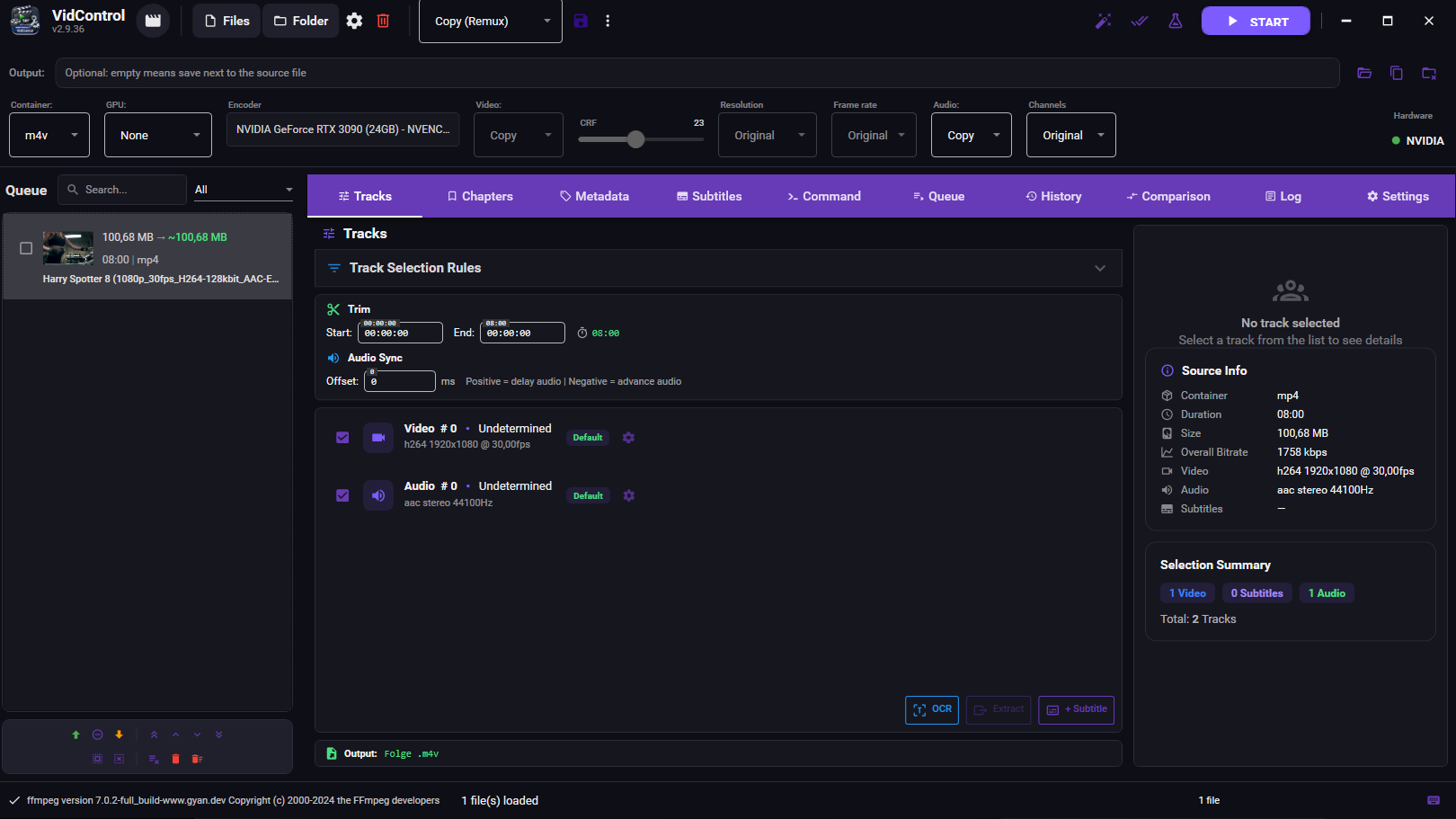
VidControl – Video Transcoding Software

VidControl

Stop switching between HandBrake, MKVToolNix and Subtitle Edit.

Encode, remux, OCR and subtitle entire series – in one workflow.

v2.9.23 Windows 10/11 · Portable – no install

Replace your entire encoding toolchain

💰

100% Free

No trial, no hidden costs, no ads. Every feature, forever.

One Tool. Everything.

Encode, subtitle, OCR and process complete series – without switching tools.

🔒

100% Local

No cloud, no telemetry, no account. Runs from a USB stick if you want.

One Workflow. Start to Finish.

Drop your files in, configure once, let VidControl handle the rest.

1
📁

Drop it in

Drag entire seasons at once. Tracks, chapters and metadata are picked up automatically.

2

Set once, reuse

Pick your tracks, choose a preset. Same settings apply to every file in the queue.

3
📝

OCR & fix

Image subs become text in seconds. Spell-check and timing – no extra tools.

4

Walk away

Hit Start. GPU batch encoding runs the entire queue while you do something else.

Features

GPU Encoding

Encode hours of video in minutes. NVENC, AMF, and QSV – your GPU does the heavy lifting.

📝

Subtitle Editor

OCR image subs to SRT, spell-check them, edit timing with a waveform – no external tools needed.

📦

Batch Queue

Process entire seasons automatically – start once and walk away.

Encoding Presets

Set up once, reuse everywhere. Custom and built-in presets for any use case.

🎬

Crop Editor

Remove black bars with one click. Auto-detection handles the rest.

🎭

Intro Detection

Audio fingerprinting finds intros and credits across entire series – trim them automatically.

All Features at a Glance

Video Encoding

  • H.264, H.265 (HEVC), and AV1 support
  • GPU encoding: NVIDIA NVENC, AMD AMF, Intel QSV
  • CRF mode for constant quality
  • Audio: AAC, AC3, Opus – or passthrough
  • Multiple audio and subtitle tracks
  • Automatic GPU/hardware detection

Subtitles

  • VobSub & PGS image subtitle OCR (Tesseract)
  • Built-in SRT editor with waveform display
  • Hunspell spell checking (DE/EN)
  • Batch OCR for complete series
  • Custom name list for OCR correction
  • Native MKV parsing without external tools

Workflow

  • Drag & drop import
  • Batch queue with auto processing
  • Watch folders – automatic monitoring
  • Custom encoding presets
  • Smart output naming
  • Encoding history with statistics

Screenshots

Changelog

v2.9.23 2026-05
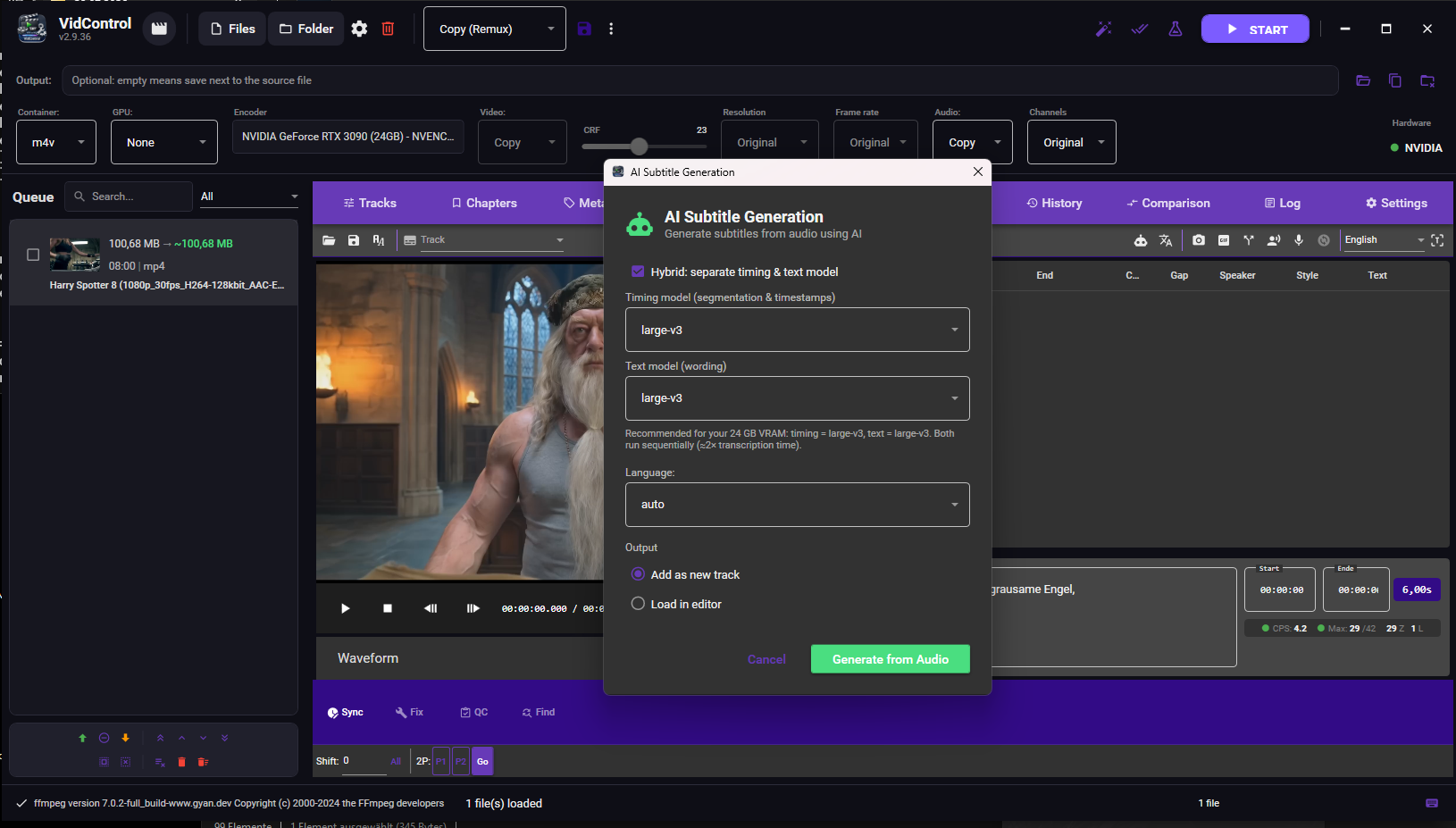
  • NEW — Hybrid transcription: choose the timing model (segmentation & timestamps) and the text model (wording) separately. Perfect when a general model like large-v3 times speech well but a language-specialised model like Belle understands the language better — it gives you the good timing AND the good words. Directly fixes the case where Belle assigns single words multi-second cues
  • The two models run one after another, so even a single GPU under 16 GB only ever loads one at a time. A recommendation is shown based on your graphics card (VRAM) — but every choice is yours; nothing is hardcoded
  • The text model's words are aligned onto the timing model's segments by content (character alignment), not by the text model's untrusted timestamps
  • NEU — Hybrid-Transkription: wähle getrennt das Timing-Modell (Segmentierung & Zeitstempel) und das Text-Modell (Wortwahl). Perfekt, wenn ein allgemeines Modell wie large-v3 gut timed, aber ein sprachspezifisches Modell wie Belle die Sprache besser versteht — du bekommst gutes Timing UND gute Wörter. Behebt direkt den Fall, dass Belle einzelnen Wörtern mehrsekündige Cues gibt
  • Die zwei Modelle laufen nacheinander, sodass selbst eine einzelne GPU unter 16 GB immer nur eines gleichzeitig lädt. Eine Empfehlung wird je nach Grafikkarte (VRAM) angezeigt — aber jede Wahl liegt bei dir; nichts ist hartkodiert
  • Die Wörter des Text-Modells werden inhaltlich (Zeichen-Alignment) auf die Segmente des Timing-Modells abgebildet, nicht über die unzuverlässigen Zeitstempel des Text-Modells
v2.9.22 2026-05
  • Fixed the readability re-segmentation so it actually fixes heavily fragmented subtitles (one word per cue — common with the Chinese model + word-by-word translation). A reading-speed gate had been blocking the very merges it needed; word-cues are now correctly merged back into full sentences
  • Added a timing step that extends merged cues into the following gap until they are comfortably readable (reading-speed target + minimum duration), never overlapping the next cue
  • Splitting now triggers only when a cue is on screen too long or has too much text to fit — not on reading speed, which more cuts can never improve
  • Die Lesbarkeits-Neusegmentierung repariert jetzt tatsächlich stark zerstückelte Untertitel (ein Wort pro Cue — typisch beim chinesischen Modell + Wort-für-Wort-Übersetzung). Eine Lesegeschwindigkeits-Sperre hatte ausgerechnet die nötigen Zusammenführungen blockiert; Wort-Cues werden jetzt korrekt zu vollständigen Sätzen zusammengeführt
  • Neuer Timing-Schritt: zusammengeführte Cues werden in die folgende Lücke verlängert, bis sie bequem lesbar sind (Ziel-Lesegeschwindigkeit + Mindestdauer), ohne den nächsten Cue zu überlappen
  • Aufteilen erfolgt nur noch, wenn ein Cue zu lange am Bildschirm steht oder zu viel Text hat — nicht mehr anhand der Lesegeschwindigkeit, die sich durch mehr Schnitte nie verbessern lässt
v2.9.21 2026-05
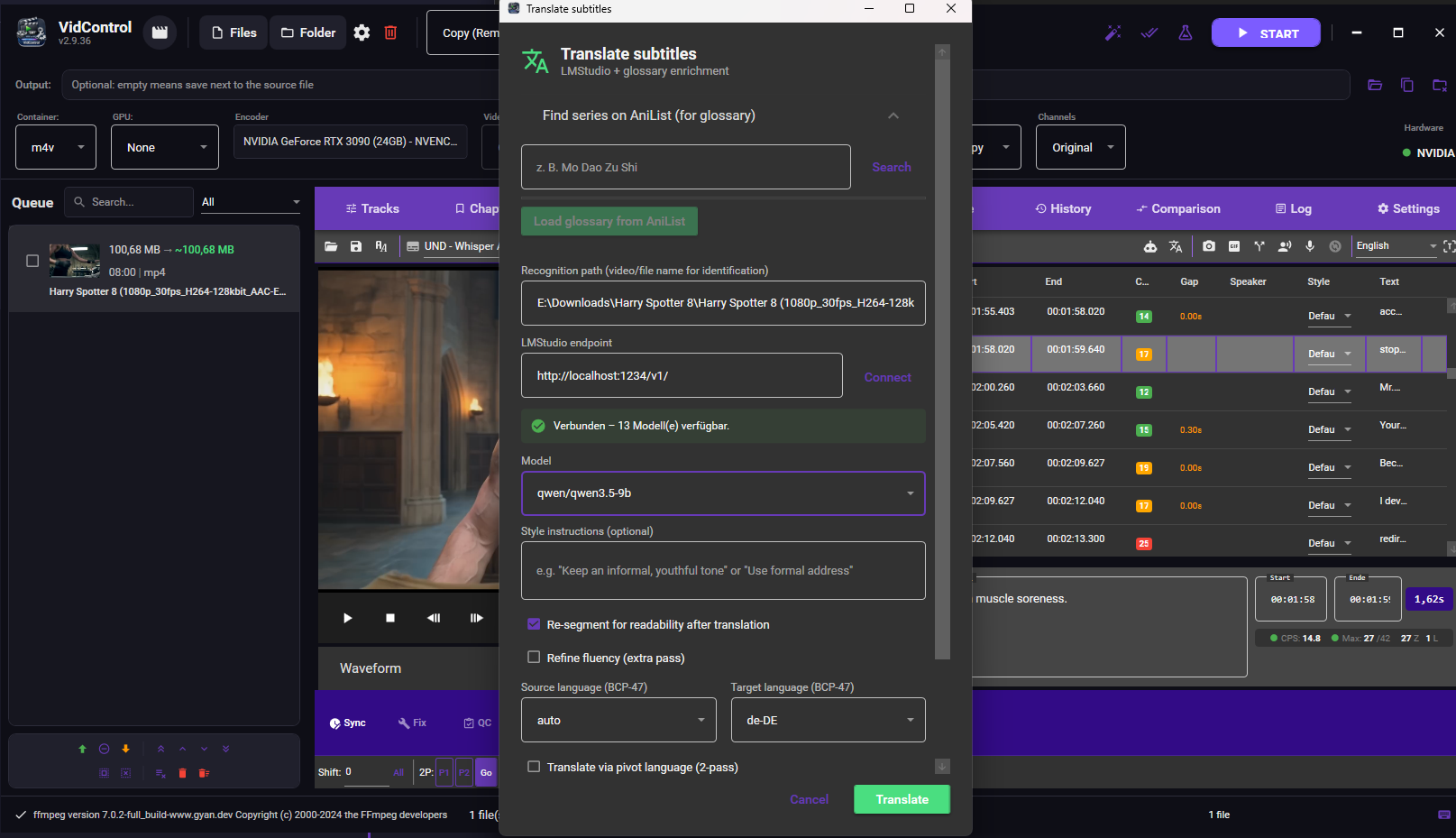
  • NEW — Context-aware translation: the LLM now sees the already-translated neighbouring cues (a rolling window) plus a few upcoming source lines, instead of translating each line in isolation. This is the biggest readability win for translated subtitles — terminology, names and register stay consistent across chunk boundaries, and sentences that span several cues read naturally
  • On by default (4 context lines); tunable via the TranslationContextSize setting (0 turns it off). Context lines are clearly marked "do not translate", so the index mapping and output are unchanged
  • NEU — Kontext-bewusste Übersetzung: das LLM sieht jetzt die bereits übersetzten Nachbar-Cues (ein rollierendes Fenster) plus ein paar kommende Original-Zeilen, statt jede Zeile isoliert zu übersetzen. Das ist der größte Lesbarkeits-Gewinn für übersetzte Untertitel — Begriffe, Namen und Anrede bleiben über Chunk-Grenzen konsistent, und Sätze über mehrere Cues lesen sich natürlich
  • Standardmäßig an (4 Kontext-Zeilen); über die Einstellung TranslationContextSize regelbar (0 = aus). Kontext-Zeilen sind klar als „nicht übersetzen" markiert — Index-Zuordnung und Ausgabe bleiben unverändert
v2.9.20 2026-05
  • NEW — Readability re-segmentation: a decoupled engine that re-cuts subtitles so the text reads naturally — merges fragmented cues, splits over-long/too-fast ones at the most natural boundary (sentence → comma → conjunction → word), and rebalances lines, with separate CJK and Latin rules and proportional time redistribution
  • Runs automatically after translation (on by default, with a toggle in the translation dialog) — fixes the common case where translated German breaks at the original Chinese cue boundaries instead of natural German ones
  • Also available as a "Re-segment" button in the subtitle editor (Fix tab), reversible with Ctrl+Z; works on any subtitles — imported SRT, OCR output, external translations, batch repair
  • Translation dialog is now scrollable with the buttons pinned at the bottom, so the "Translate" button is always visible even on small or scaled displays
  • NEU — Lesbarkeits-Neusegmentierung: eine entkoppelte Engine, die Untertitel so neu schneidet, dass der Text natürlich liest — führt fragmentierte Cues zusammen, teilt zu lange/zu schnelle an der natürlichsten Grenze (Satz → Komma → Konjunktion → Wort) und balanciert Zeilen aus; getrennte CJK-/Latein-Regeln und proportionale Zeitverteilung
  • Läuft automatisch nach der Übersetzung (standardmäßig an, abschaltbar im Übersetzungsdialog) — fixt den häufigen Fall, dass übersetztes Deutsch an den ursprünglichen chinesischen Cue-Grenzen statt an natürlichen deutschen umbricht
  • Auch als „Neu segmentieren"-Button im Untertitel-Editor (Fix-Tab), rückgängig per Strg+Z; funktioniert für beliebige Untertitel — importierte SRT, OCR-Ausgabe, externe Übersetzungen, Batch-Reparatur
  • Übersetzungsdialog ist jetzt scrollbar mit unten fixierten Buttons, sodass der „Übersetzen"-Button immer sichtbar ist — auch auf kleinen oder skalierten Bildschirmen
v2.9.19 2026-05
  • NEW — Target-VMAF auto-CRF: VidControl sample-encodes a few representative segments and binary-searches the highest CRF (smallest file) that still reaches your quality target (e.g. VMAF 95). One button in Advanced Video settings opens a live probe dialog and applies the chosen CRF to your preset
  • VMAF analysis fixed: an unescaped Windows drive-letter colon in the libvmaf filtergraph meant VMAF never actually ran; also made resolution-robust via scale2ref
  • Fixed a startup crash in 2.9.18: duplicate localization keys (left over from the i18n waves) threw before logging initialized, so the app exited with no error dialog and no log
  • Diagnostics export now redacts webhook URLs (not just keys/tokens)
  • Subtitle editor: pacing now operates on the correct file if you switch tracks during the audio analysis; removed double event-subscriptions on track load; QC auto-fixes pick the correct neighbour cue when two cues share a start time
  • Settings are saved thread-safely — structural list mutations during parallel encodes can no longer make a debounced save silently fail
  • NEU — Ziel-VMAF Auto-CRF: VidControl probe-codiert ein paar repräsentative Segmente und findet per Binärsuche den höchsten CRF (kleinste Datei), der dein Qualitätsziel (z. B. VMAF 95) noch erreicht. Ein Button in den erweiterten Video-Einstellungen öffnet einen Live-Dialog und übernimmt den ermittelten CRF ins Preset
  • VMAF-Analyse repariert: ein nicht-escapter Windows-Laufwerks-Doppelpunkt im libvmaf-Filtergraph ließ VMAF nie laufen; zusätzlich auflösungsrobust via scale2ref
  • Startup-Absturz aus 2.9.18 behoben: doppelte Lokalisierungs-Schlüssel (Rest aus den i18n-Wellen) warfen vor der Logging-Initialisierung — die App beendete sich ohne Fehlerdialog und ohne Log
  • Diagnose-Export schwärzt jetzt auch Webhook-URLs (nicht nur Keys/Tokens)
  • Untertitel-Editor: Pacing arbeitet auf der richtigen Datei, wenn man während der Audio-Analyse den Track wechselt; doppelte Event-Abos beim Track-Laden entfernt; QC-Auto-Fixes wählen bei gleichen Startzeiten den korrekten Nachbar-Cue
  • Einstellungen werden thread-sicher gespeichert — strukturelle Listen-Änderungen während paralleler Encodes können einen entprellten Speichervorgang nicht mehr still scheitern lassen
v2.9.18 2026-05
  • Command palette (Ctrl+Shift+P): fuzzy-search every command, preset and recent file — any of the ~119 actions reachable in two keystrokes
  • Universal undo/redo in the subtitle editor (Ctrl+Z / Ctrl+Y) across all ~28 mutating operations — batch and AI edits are now safely reversible
  • Subtitle QC linter with one-click "fix all" (Netflix/EBU profiles, dedicated CJK reading-speed & line-length limits): reading speed, line length/count, min/max duration, overlaps and gaps
  • Snap-to-silence activated: cue edges now align to real detected audio gaps in both the editor and the Whisper flow; waveform peaks are cached to disk so reopening is instant
  • Crash-safe settings: atomic writes (no more truncated settings.json), debounced auto-save, and a redacted diagnostics .zip export for bug reports
  • Encoding: HDR10 static metadata (MaxCLL + mastering-display) is now preserved on libx265 output, AV1 film-grain synthesis, an encoder -tune selector, sharper Lanczos downscaling, +faststart for MP4, NVENC spatial/temporal AQ, and a VMAF analysis fix that made it work on Windows at all
  • Translation: pinned term overrides ("this name always becomes that") are now enforced after the LLM, a free-text style/register instructions field, and a higher Whisper decode-quality floor
  • Befehlspalette (Strg+Umschalt+P): Fuzzy-Suche über jeden Befehl, jedes Preset und zuletzt geöffnete Dateien — alle ~119 Aktionen in zwei Tastenanschlägen erreichbar
  • Universelles Rückgängig/Wiederholen im Untertitel-Editor (Strg+Z / Strg+Y) über alle ~28 mutierenden Operationen — Stapel- und KI-Bearbeitungen sind jetzt sicher umkehrbar
  • Untertitel-QC-Linter mit Ein-Klick-„Alle beheben" (Netflix/EBU-Profile, eigene CJK-Grenzwerte für Lesegeschwindigkeit & Zeilenlänge): Lesegeschwindigkeit, Zeilenlänge/-anzahl, Min/Max-Dauer, Überlappungen und Lücken
  • Snap-to-Silence aktiviert: Cue-Kanten richten sich jetzt an echten erkannten Tonpausen aus — im Editor und im Whisper-Ablauf; Waveform-Daten werden auf Platte zwischengespeichert
  • Absturzsichere Einstellungen: atomares Schreiben (keine abgeschnittene settings.json mehr), entprellter Auto-Save und ein bereinigter Diagnose-.zip-Export für Fehlerberichte
  • Encoding: HDR10-Metadaten (MaxCLL + Mastering-Display) bleiben bei libx265 erhalten, AV1-Filmkorn-Synthese, Encoder-„tune"-Auswahl, schärferes Lanczos-Herunterskalieren, +faststart für MP4, NVENC Spatial/Temporal-AQ und ein VMAF-Fix, der die Analyse unter Windows überhaupt erst funktionieren lässt
  • Übersetzung: feste Begriffs-Overrides („dieser Name wird immer zu jenem") werden jetzt nach dem LLM erzwungen, ein Freitext-Feld für Stil/Anrede und eine höhere Whisper-Decode-Qualität
v2.9.17 2026-05
  • FFmpeg setup dialog on first run: auto-download from BtbN (~80 MB), point at existing ffmpeg.exe, or skip for now — no more "where do I get FFmpeg" wall for new users
  • Extended FFmpeg detection chain: settings path → tools/ffmpeg/ → tools/ffmpeg/bin/ → PATH → common install locations
  • FFmpegProcessManager hot-swappable path — after auto-download, encoding becomes available without an app restart
  • CLAUDE.md updated: FFmpeg is deliberately not bundled to keep VidControl decoupled from FFmpeg's monthly release cycle and avoid LGPL/GPL attribution overhead
  • FFmpeg-Setup-Dialog beim ersten Start: Auto-Download von BtbN (~80 MB), Pfad zu existierender ffmpeg.exe, oder „später kümmern" — keine „wo bekomme ich FFmpeg her?"-Wand mehr für neue User
  • FFmpeg-Erkennungs-Kette erweitert: Settings-Pfad → tools/ffmpeg/ → tools/ffmpeg/bin/ → PATH → typische Install-Pfade
  • FFmpegProcessManager Pfad hot-swappable — nach Auto-Download wird Encoding ohne App-Neustart verfügbar
  • CLAUDE.md aktualisiert: FFmpeg ist bewusst nicht gebundled um VidControl vom monatlichen FFmpeg-Release-Cycle zu entkoppeln und LGPL/GPL-Attribution-Overhead zu vermeiden
v2.9.16 2026-05
  • Video codec dropdown now filters by hardware capabilities — codecs your NVENC/AMF/QSV can't actually encode (e.g. VP9 on any GPU, AV1 without Ada/RDNA3/Arc) are no longer selectable, preventing silent CPU fallbacks
  • ASS/SSA subtitle burn: embedded font/size/outline from the source file is now honored by default instead of being overridden with Arial (new override checkbox if you want the old behavior)
  • HEVC 10-bit on Pascal NVENC: detects the GPU can't encode 10-bit HEVC and converts to NV12 automatically instead of silently dropping to 8-bit
  • Settings loader now retries on file locks (OneDrive sync, antivirus, second VidControl instance) instead of falling back to defaults and silently losing user settings
  • Subtitle editor distinguishes save errors: read-only file vs. locked by another process vs. generic — clearer feedback
  • Whisper process kill uses a retry loop on cancel — no more zombie processes
  • UTF-16 subtitle files without BOM are now detected (previously garbled text)
  • Custom FFmpeg audio args now sanitized the same way video args are
  • FilePath null validation in the encoding pipeline — explicit error instead of cryptic "no such file" from FFmpeg
  • Resegmenter: crash guard for files with ≤1 entry
  • Video-Codec-Dropdown filtert jetzt nach Hardware-Fähigkeiten — Codecs die NVENC/AMF/QSV nicht encoden können (z. B. VP9 auf allen GPUs, AV1 ohne Ada/RDNA3/Arc) sind nicht mehr wählbar und verhindern stille CPU-Fallbacks
  • ASS/SSA-Untertitel beim Einbrennen: eingebettete Font/Größe/Outline aus dem Source werden standardmäßig respektiert statt mit Arial überschrieben (neue Override-Checkbox für das alte Verhalten)
  • HEVC 10-bit auf Pascal-NVENC: erkennt dass die GPU kein 10-bit HEVC encoden kann und konvertiert automatisch nach NV12 statt still auf 8 bit zu droppen
  • Settings-Loader hat jetzt Retry bei File-Locks (OneDrive-Sync, Antivirus, zweite VidControl-Instanz) statt Defaults zu laden und User-Einstellungen still zu verlieren
  • Subtitle-Editor unterscheidet Save-Fehler: schreibgeschützte Datei vs. von anderem Prozess gelockt vs. generisch — klareres Feedback
  • Whisper-Process-Kill mit Retry-Loop bei Cancel — keine Zombie-Prozesse mehr
  • UTF-16-Untertitel-Files ohne BOM werden erkannt (vorher: Müll-Text)
  • Custom-FFmpeg-Audio-Args werden jetzt wie Video-Args sanitized
  • FilePath-Null-Validierung in der Encoding-Pipeline — klarer Fehler statt kryptischem "no such file" aus FFmpeg
  • Resegmenter: Crash-Schutz bei Files mit ≤1 Eintrag
v2.9.15 2026-05
  • Complete English localization — every dialog, status message, queue state, and error text fully translated (around 400 strings localized across two waves)
  • OCR default language now follows the UI language (English UI → English OCR; previously always German regardless of UI)
  • First-run language derived from your OS culture instead of forcing English
  • Output folder selector promoted to the main toolbar with browse + one-click „use source folder" reset (was previously buried in Settings)
  • Whisper VAD parameters (threshold, min silence, max speech per segment) exposed in Settings for power users
  • Belle Chinese model made usable — Silero VAD pre-segmentation forces sub-cues ≤ 12s instead of 30-60s blocks
  • CJK-aware post-splitting: Chinese subtitles split at 。?!,;、 with character-proportional time distribution
  • Whisper hallucination detection: phonetic-floor heuristic auto-drops garbage cues under 0.40s
  • Pacing review dialog with two tabs (hallucinations + merges) and ▶ audio preview per cue
  • Update system fixed — was reporting 2.7.4 as latest despite newer 2.9.x releases
  • Ctrl+H opens Find & Replace in the subtitle editor; tooltips added for video player and sync point actions
  • Vollständige englische Lokalisierung — alle Dialoge, Status-Meldungen, Queue-Zustände und Fehlertexte komplett übersetzt (rund 400 Strings in zwei Wellen lokalisiert)
  • OCR-Standardsprache folgt der UI-Sprache (Englisches UI → English OCR; vorher immer Deutsch, egal welche UI-Sprache)
  • Erstmaliger App-Start erkennt jetzt die OS-Sprache statt stur Englisch zu setzen
  • Ausgabe-Ordner-Auswahl direkt im Hauptfenster — Browse-Button + „Quellordner verwenden"-Reset (war vorher in Settings versteckt)
  • Whisper-VAD-Parameter (Threshold, Min Stille, Max Sprache pro Segment) über Settings einstellbar
  • Belle-Modell für Chinesisch brauchbar gemacht — Silero-VAD-Pre-Segmentierung erzwingt Sub-Cues ≤ 12 s statt 30-60 s Blöcken
  • CJK-fähiges Post-Splitting: chinesische Untertitel werden an 。?!,;、 zerlegt, Zeit zeichen-proportional verteilt
  • Whisper-Halluzinations-Erkennung: phonetischer Floor löscht Müll-Cues unter 0.40 s automatisch
  • Pacing-Review-Dialog mit zwei Tabs (Halluzinationen + Merges) und ▶ Audio-Vorhören pro Cue
  • Update-System repariert — zeigte 2.7.4 als „latest" trotz vorhandener 2.9.x-Versionen
  • Ctrl+H öffnet Find & Replace im Untertitel-Editor; Tooltips ergänzt für Video-Player und Sync-Punkt-Aktionen
v2.7.4 2026-03
  • EAC3/Atmos audio in M4V output: FFmpeg muxer fix prevents exit code -22
  • Intro detection retroactive: Already loaded files are scanned when enabling the feature
  • Fixed pipe deadlocks in 5 services (DoviTool, AutoSync, PostProcessing etc.)
  • Crash safety: fixed async-void crash in GPU monitor and update dialog
  • Thread safety & resource leak fixes across 22 files
  • OCR spell correction: Replacements now context-aware per word
  • PropertyChanged notifications for file size, bitrate, speed, ETA
  • EAC3/Atmos-Audio in M4V-Output: FFmpeg-Muxer-Fix verhindert Exit-Code -22
  • Intro-Erkennung retroaktiv: Bereits geladene Dateien werden beim Aktivieren automatisch gescannt
  • Pipe-Deadlocks behoben in 5 Services (DoviTool, AutoSync, PostProcessing u.a.)
  • Absturzsicherheit: async-void Crash in GPU-Monitor und Update-Dialog behoben
  • Thread-Safety & Resource-Leak Fixes in 22 Dateien
  • OCR-Rechtschreibkorrektur: Ersetzungen nur noch kontextbewusst pro Wort
  • PropertyChanged-Benachrichtigungen für Dateigröße, Bitrate, Speed, ETA
v2.7.3 2026-02
  • Remove scene tags: Option to automatically strip release tags from filenames (e.g. German AC3 480p WEBRip XviD-FND)
  • Queue context menu: Open output folder, open source file, move output file
  • PDB files are no longer generated in release builds
  • Scene-Tags entfernen: Option zum automatischen Entfernen von Release-Tags aus Dateinamen (z.B. German AC3 480p WEBRip XviD-FND)
  • Queue-Kontextmenü: Ausgabeordner öffnen, Quelldatei öffnen, Ausgabedatei verschieben
  • PDB-Dateien werden im Release nicht mehr erzeugt
v2.7.2 2026-02
  • Custom titlebar: Toolbar is now the title bar — saves one row of height
  • Min/Max/Close buttons clearly visible in purple toolbar (dark theme fix)
  • Status bar at bottom doubles as drag area for window movement
  • Custom Titlebar: Toolbar ist jetzt die Titelleiste — spart eine Zeile Höhe
  • Min/Max/Close-Buttons klar sichtbar im lila Bereich (Dark Theme Fix)
  • Statusleiste unten als zusätzlicher Drag-Bereich zum Fenster verschieben
v2.7.1 2026-02
  • Minor bugfixes and stability improvements
  • Bugfixes und Stabilitätsverbesserungen
v2.7.0 2026-02
  • Settings decluttered: Progressive disclosure with collapsible expanders
  • Advanced Video, Custom Filters, Expert Options, Post-Processing now collapsed by default
  • Track Selection Rules: Basic options visible, advanced options in sub-expander
  • ~40% less visual noise in Settings — no features removed, just hidden for power users
  • Fixed: Auto-update check did not detect new versions due to HTTP caching — please update manually this one time
  • Einstellungen entschlackt: Progressive Disclosure mit einklappbaren Expandern
  • Erweiterte Video-, Custom Filter-, Experten-Optionen und Nachbearbeitung standardmäßig eingeklappt
  • Spurauswahl-Regeln: Basis-Optionen sichtbar, erweiterte Optionen im Sub-Expander
  • ~40% weniger visuelles Rauschen in den Einstellungen — kein Feature entfernt, nur für Power-User versteckt
  • Behoben: Auto-Update hat neue Versionen wegen HTTP-Caching nicht erkannt — bitte dieses eine Mal manuell updaten
v2.6.5 2026-02
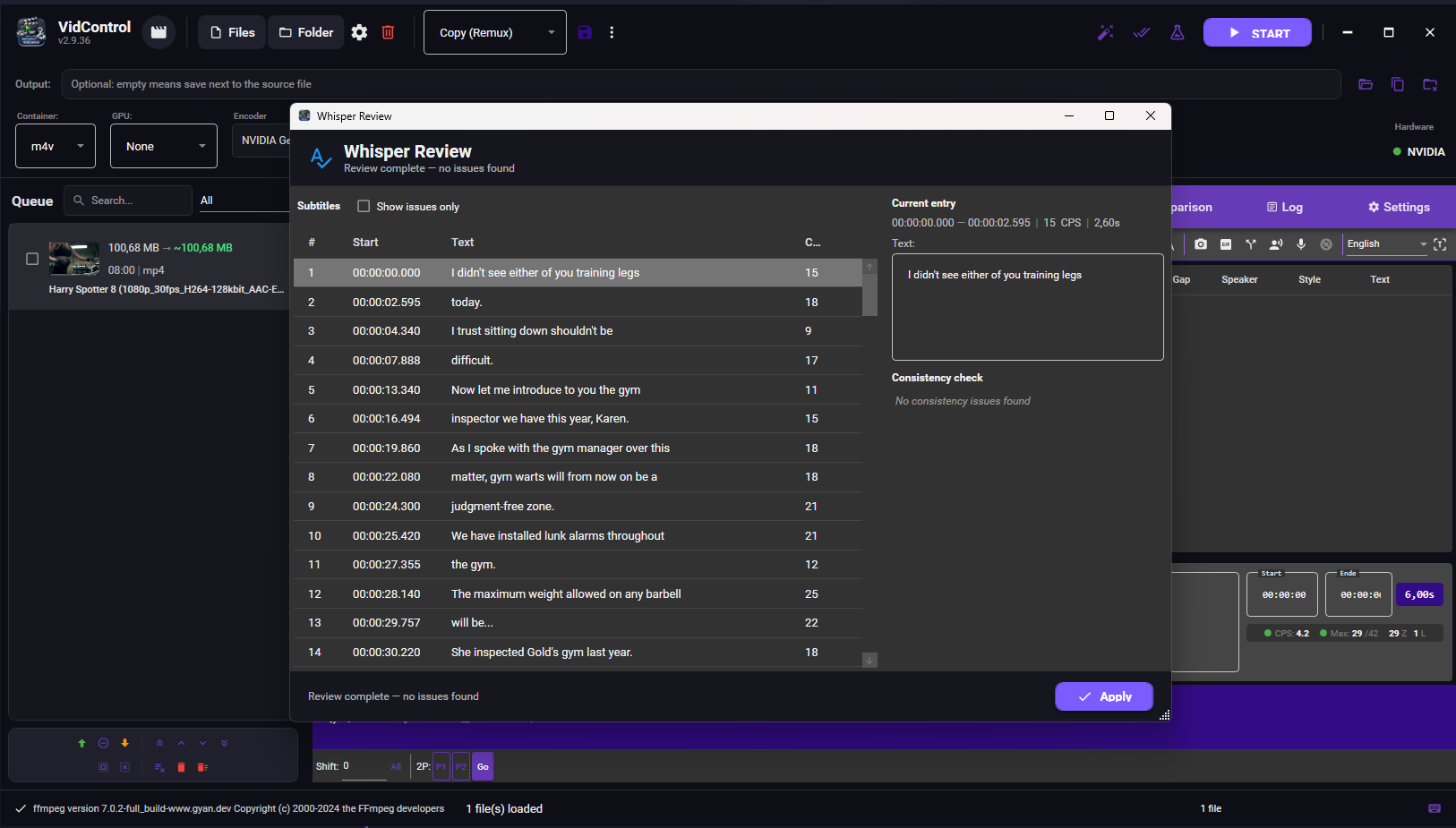
  • Whisper Review: Spell check & consistency review after transcription
  • Interactive spell check with Hunspell (same as OCR review)
  • Consistency checks: duplicate entries, high CPS, short duration, inconsistent spellings
  • Automatic language mapping (Whisper → Hunspell dictionaries)
  • Whisper Review: Rechtschreibprüfung & Konsistenzprüfung nach Transkription
  • Interaktive Rechtschreibprüfung mit Hunspell (wie OCR-Review)
  • Konsistenzprüfung: Duplikate, hohe CPS, kurze Dauer, inkonsistente Schreibweisen
  • Automatisches Sprach-Mapping (Whisper → Hunspell-Wörterbücher)
v2.6.2 2026-02
  • Whisper dialog: All inputs locked during processing (only Cancel active)
  • Whisper-Dialog: Alle Eingaben während Verarbeitung gesperrt (nur Abbrechen aktiv)
v2.6.1 2026-02
  • Fixed Faster-Whisper-XXL extraction error (solid 7z archives)
  • Generate button now disabled during download/extraction
  • Added download size and extraction duration hint
  • Faster-Whisper-XXL Entpackfehler behoben (solid 7z-Archive)
  • Generate-Button wird während Download/Entpacken gesperrt
  • Hinweis zu Downloadgröße und Entpackdauer hinzugefügt
v2.6.0 2026-02
  • Faster-Whisper-XXL: AI speech recognition with VAD for accurate timestamps
  • Automatic backend selection: Faster-Whisper preferred, whisper.cpp as fallback
  • Language-specific whisper models: Chinese (Belle-large-v3) and Japanese (Kotoba v2.0)
  • Specialized model download: One-click install from HuggingFace
  • Sharpen/Denoise filters now work in Copy mode (auto-transcode)
  • Improved file size estimation for hardware encoders (NVENC, QSV, AMF)
  • Progress bar fix: Overall progress now updates correctly for single files
  • Stability: Process cleanup on cancel, thread-safe progress tracking
  • Faster-Whisper-XXL: KI-Spracherkennung mit VAD für präzise Timestamps
  • Automatische Backend-Wahl: Faster-Whisper bevorzugt, whisper.cpp als Fallback
  • Sprachspezifische Whisper-Modelle: Chinesisch (Belle-large-v3) und Japanisch (Kotoba v2.0)
  • Spezialisierter Model-Download: Ein-Klick-Installation von HuggingFace
  • Sharpen/Denoise-Filter funktionieren jetzt im Copy-Modus (Auto-Transcode)
  • Verbesserte Dateigrößen-Schätzung für Hardware-Encoder (NVENC, QSV, AMF)
  • Fortschrittsbalken-Fix: Gesamtfortschritt wird bei einzelnen Dateien korrekt angezeigt
  • Stabilität: Prozess-Cleanup bei Abbruch, Thread-sichere Fortschrittsverfolgung
v2.5.0 2026-02
  • CFR/VFR frame rate mode: Control constant vs. variable output
  • Color range conversion: Limited (TV) / Full (PC) range
  • Video rotation: Easy 90°/180°/270° rotation
  • DVD restoration filters: DotCrawl removal, Chroma Smooth, Dejudder, Temporal Denoise
  • Subtitle editor: Search fixed, better toolbar visibility, DELETE key support
  • Subtitle list: Clear selection highlight, wider time columns
  • CFR/VFR Bildratenmodus: Kontrolle ob Output konstant oder variabel
  • Farbbereich-Konvertierung: Limited (TV) / Full (PC) Range
  • Video-Rotation: Einfaches Drehen um 90°/180°/270°
  • DVD Restaurierungs-Filter: DotCrawl, Chroma Smooth, Dejudder, Temporal Denoise
  • Untertitel-Editor: Suchfunktion repariert, bessere Toolbar-Sichtbarkeit, DELETE-Taste
  • Untertitel-Liste: Deutliche Auswahl-Markierung, breitere Zeitspalten
v2.4.0 2026-02
  • A/B Comparison view with frame-by-frame quality check
  • VMAF quality analysis (integrated libvmaf scoring)
  • Test encode: 30-second preview before full encoding
  • ASS/SSA subtitle style editor (fonts, colors, alignment)
  • Scene detection with automatic chapter generation
  • HDR tonemapping and deinterlace filter support
  • Custom filter chain builder (20+ FFmpeg filters)
  • Legacy format detection with modernization presets
  • Dolby Vision profile detection and conversion
  • Improved progress bar with real-time percentage
  • A/B-Vergleichsansicht mit Frame-für-Frame Qualitätsprüfung
  • VMAF Qualitätsanalyse (integriertes libvmaf Scoring)
  • Test-Encode: 30-Sekunden Vorschau vor vollem Encoding
  • ASS/SSA Untertitel-Style-Editor (Schriften, Farben, Ausrichtung)
  • Szenenerkennung mit automatischer Kapitelgenerierung
  • HDR-Tonemapping und Deinterlace-Filter Unterstützung
  • Eigener Filter-Chain-Builder (20+ FFmpeg-Filter)
  • Legacy-Format-Erkennung mit Modernisierungs-Presets
  • Dolby Vision Profilerkennung und -konvertierung
  • Verbesserte Fortschrittsanzeige mit Echtzeit-Prozent
v2.3.2 2026-02
  • Fixed GPU detection on multi-GPU systems (dGPU now preferred over iGPU)
  • All GPUs detected: NVENC, QSV, and AMF tested independently
  • Unavailable encoders are now grayed out in the dropdown
  • GPU info shows all available encoders at a glance
  • GPU-Erkennung bei Multi-GPU-Systemen behoben (dGPU wird jetzt bevorzugt)
  • Alle GPUs werden erkannt: NVENC, QSV und AMF unabhängig getestet
  • Nicht verfügbare Encoder sind im Dropdown ausgegraut
  • GPU-Info zeigt alle verfügbaren Encoder auf einen Blick
v2.3.0 2026-02
  • Intro detection with audio fingerprinting
  • Credits detection (silence analysis)
  • Batch OCR for all files in queue
  • In-app update mechanism
  • Automatic signature updates for intro detection
  • Intro-Erkennung mit Audio-Fingerprinting
  • Abspann-Erkennung (Stille-Analyse)
  • Batch-OCR für alle Dateien in der Queue
  • In-App Update-Mechanismus
  • Automatische Signatur-Updates für Intro-Erkennung
v2.2.20 2026-02
  • Batch OCR for multiple files at once
  • Interactive spell checking in OCR dialog
  • Watch folder monitoring
  • Improved VobSub timing correction
  • Batch-OCR für mehrere Dateien auf einmal
  • Interaktive Rechtschreibprüfung im OCR-Dialog
  • Watch Folder Überwachung
  • Verbesserte VobSub Timing-Korrektur
v2.2.0 2026-01
  • GPU encoding: NVENC, AMF & QSV support
  • New crop editor with preview
  • Encoding presets (custom & predefined)
  • Encoding history with statistics
  • GPU-Encoding: NVENC, AMF & QSV Support
  • Neuer Crop-Editor mit Vorschau
  • Encoding-Presets (eigene & vordefinierte)
  • Encoding-Verlauf mit Statistiken
v2.0.0 2025-12
  • Completely new UI with dark theme
  • Built-in subtitle editor with waveform
  • Native MKV parsing
  • Drag & drop import
  • Komplett neues UI mit Dark Theme
  • Integrierter Untertitel-Editor mit Waveform
  • Native MKV-Parsing
  • Drag & Drop Import

Feedback

Downloads

Version Date Size SHA-256 Download
v2.9.23 Latest 2026-05-30 70.3 MB Download
v2.9.19 2026-05-29 70.3 MB Download
v2.9.16 2026-05-29 70.3 MB Download
v2.9.13 2026-05-28 70.3 MB Download
v2.7.4 2026-03-10 69.1 MB Download
v2.7.3 2026-02-27 69.1 MB Download
v2.7.2 2026-02-25 69.6 MB Download
v2.7.1 2026-03-24 36.1 MB Download
v2.7.0 2026-02-20 69.6 MB Download
v2.6.5 2026-02-19 69.5 MB Download
v2.6.2 2026-02-19 69.5 MB Download
v2.6.1 2026-02-19 69.5 MB Download
v2.6.0 2026-02-18 69.5 MB Download
v2.5.0 2026-02-16 69.1 MB Download
v2.4.0 2026-02-16 69.1 MB Download
v2.3.2 2026-02-15 69 MB Download
v2.3.1 2026-02-15 69 MB Download
v2.3.0 2026-02-15 69 MB Download
v2.2.21 2026-02-13 69 MB Download
v2.2.20 2026-02-13 69.8 MB Download

Verify the download integrity by comparing the hash: Get-FileHash VidControl_v<version>.zip -Algorithm SHA256 (PowerShell) or sha256sum VidControl_v<version>.zip (Linux/macOS).